

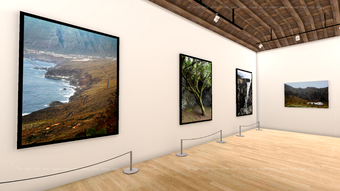
Description
Download Virtual Art Gallery VR Museum – Art Gallery App, VR Museum, Virtual Exhibition, Android Software, Free Art Tool
Overview
The Virtual Art Gallery VR Museum is a free Android application developed by MoadStudio, designed to transform digital artwork into immersive virtual exhibitions. This desktop-like experience allows users to explore curated galleries featuring paintings, photographs, and other visual art forms within a simulated virtual reality environment. The app enables artists, photographers, and creatives to showcase their work in a customizable digital space, offering a unique platform for public display without physical constraints.
Users can navigate between rooms using on-screen arrows, creating a fluid and intuitive browsing experience. The app supports personal exhibitions, allowing creators to define gallery size, room layout, number of displayed works, presentation style, navigation method, and background music. This flexibility makes it ideal for independent artists seeking to present their portfolios in an engaging, interactive format. While primarily designed for Android, the app's virtual museum concept suggests potential use in educational, cultural, or promotional contexts.
The developer did not provide additional information about the organization or its background. Real-world usage scenarios include digital art showcases, online portfolios, virtual art fairs, and educational demonstrations. The app’s free model enhances accessibility, making it a valuable tool for emerging artists and small creative studios aiming to reach global audiences without cost barriers.
Key Features & Capabilities
- Immersive Virtual Museum Experience: Users can explore a 3D-rendered gallery space that simulates a real-world museum, enhancing engagement with visual content through spatial interaction.
- Customizable Exhibition Settings: Creators can tailor their gallery by adjusting size, room configuration, number of displayed artworks, and presentation mode to match their artistic vision.
- Flexible Navigation System: On-screen arrows allow seamless movement between rooms, supporting intuitive exploration without requiring complex controls or VR headsets.
- Personalized Art Display: Each user can curate their own exhibition, including the ability to select specific works, arrange them visually, and control playback of background music.
- Multi-Artist Gallery Access: Users can view works from various artists, fostering a community-driven platform for art discovery and appreciation.
- Free Access & Android Compatibility: The application is available at no cost on Android devices, lowering entry barriers for both creators and viewers.
These features enable artists to present their work in a dynamic, interactive environment that mimics a physical gallery. For example, a photographer could create a themed exhibition of coastal landscapes, set within a custom-designed seaside room with ambient ocean sounds. Similarly, a digital artist might showcase a series of abstract pieces across multiple rooms, each with distinct lighting and music to reflect different moods. The ability to customize presentation elements ensures that the exhibition aligns with the creator’s intent and audience expectations.
User Interface, Workflow & Performance
The user interface is designed around a minimalist, screen-based navigation system centered on on-screen arrows for room transitions. This layout prioritizes simplicity and accessibility, particularly for users unfamiliar with VR or complex control schemes. The absence of detailed visual feedback or interactive hotspots suggests a focus on basic functionality rather than advanced interactivity.
Workflow efficiency is centered on the customization and display process. Users can select artworks, assign them to rooms, and adjust settings through a straightforward menu system. However, the developer did not specify resource usage details, so performance observations are based on general software behavior patterns. The app likely operates within standard Android memory and processing limits, but exact CPU or RAM consumption was not provided.
Stability and responsiveness are expected to align with typical Android applications of similar scope. Since the app is free and designed for mobile platforms, it may prioritize lightweight operation over high-fidelity graphics. No information was given regarding crash rates, update frequency, or long-term reliability. Users should expect consistent behavior under normal conditions, though real-world performance may vary based on device capabilities and background processes.
Compatibility & System Requirements
Virtual Art Gallery VR Museum is compatible with Android operating systems. The application is available for download on Android devices, though specific version requirements were not listed. Installation size information was not provided, so users should expect a typical footprint for a media-rich app, possibly ranging from a few hundred megabytes to over a gigabyte depending on the number of included artworks.
Hardware requirements were not specified by the developer. General expectations suggest that the app will run on standard Android smartphones and tablets with sufficient screen resolution and graphics support. However, exact minimum specifications such as processor speed, RAM, or GPU capabilities were not disclosed. The developer did not provide additional system requirements, making it difficult to determine compatibility with older or lower-end devices.
Pros and Cons
Pros
- Free to download and use, reducing financial barriers for artists and creators.
- Offers full customization of exhibition layout, size, and presentation style.
- Enables artists to showcase their work in a virtual museum environment without physical space constraints.
- Supports multi-room navigation via simple on-screen controls.
- Allows background music and visual themes to enhance the exhibition atmosphere.
- Accessible on Android devices, promoting widespread availability.
Cons
- Exact system requirements and performance data were not provided.
- Limited to Android platform; no information on desktop or iOS availability.
- Navigation relies solely on on-screen arrows, which may feel restrictive for some users.
- Customization options may be limited without detailed documentation or tutorials.
- No indication of offline functionality or cloud sync capabilities.
- Developer background and support channels were not disclosed.
FAQ Section
Is Virtual Art Gallery VR Museum available for Windows or Mac?
The app is currently available only for Android devices. There is no information about desktop versions for Windows or Mac.
Can I use this app offline?
It is unclear whether the app supports offline usage. The developer did not specify whether content needs an internet connection for access or display.
Is the app secure to download?
As a free app from a known developer, MoadStudio, it is likely safe to download. However, users should only obtain the app from official Android sources to avoid potential risks.
How often does the app receive updates?
Update frequency was not mentioned by the developer. No information is available on the release schedule or version history.
What kind of license does the app have?
The app is distributed as free software, but the specific license type (e.g., open-source, proprietary) was not disclosed.
Final Thoughts + CTA
Virtual Art Gallery VR Museum offers a compelling solution for artists and photographers seeking to present their work in an immersive, customizable digital space. Its free model, combined with flexible exhibition settings and intuitive navigation, makes it a strong choice for creators who want to reach a broader audience without the cost or logistics of physical exhibitions. While the lack of detailed system requirements and platform expansion limits its accessibility for some users, the core functionality remains robust and purpose-driven.
Artists, educators, and independent creatives will benefit most from this tool, especially those looking to build a digital portfolio or host virtual art events. The ability to tailor every aspect of the gallery—from room design to background music—ensures a personalized and expressive experience. Despite the absence of advanced features or cross-platform support, the app delivers on its promise of a virtual museum experience.
Download Virtual Art Gallery VR Museum now
Guides & Tutorials for Virtual Art Gallery VR Museum
How to install Virtual Art Gallery VR Museum
- Click the Preview / Download button above.
- Once redirected, accept the terms and click Install.
- Wait for the Virtual Art Gallery VR Museum download to finish on your device.
How to use Virtual Art Gallery VR Museum
This software is primarily used for its core features described above. Open the app after installation to explore its capabilities.
User Reviews for Virtual Art Gallery VR Museum 0
No reviews found





